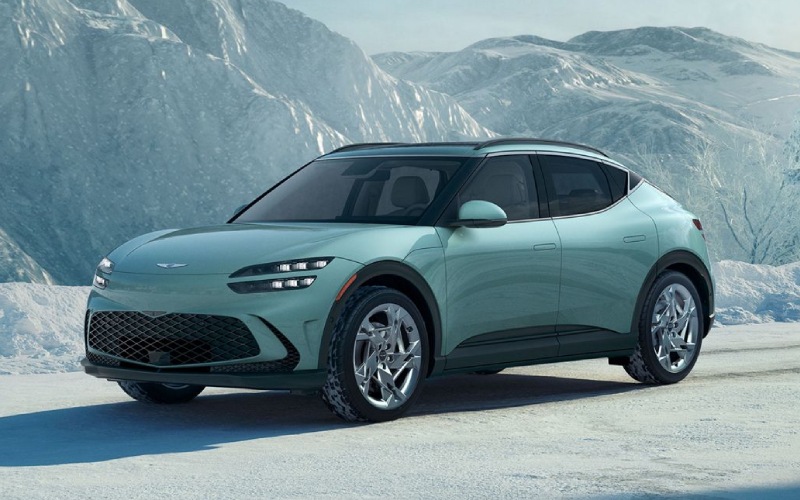
Genesis of San Bruno - Can the 2026 Genesis GV60 Use Tesla Superchargers around Oakland, CA?
The 2026 Genesis GV60 now includes an updated NACS charging port, which means you can plug in at thousands of Tesla Superchargers across the U.S. — including convenient sites around Oakland, Emeryville, and Berkeley. For shoppers weighing real-world ownership, this single change can simplify everything from weekday top-ups near Jack London Square to quick highway fills along I-580 and I-80. At Genesis of San Bruno, we help Bay Area drivers set up charging confidently so the GV60’s electric performance and luxury tech fit right into daily life.
Below, we break down how Supercharging works for the GV60, what to expect for charge times, and how to plan local or longer trips from the East Bay. We will also share a few practical charging etiquette tips for busy Bay Area sites and how our team can help you get started — whether you are new to EVs or simply new to Tesla’s network.
How Supercharging Works With the 2026 GV60’s NACS Port
Genesis states that with the updated NACS port, the 2026 GV60 gains access to 20,000 Tesla Superchargers, along with upcoming access to the new IONNA network. For Oakland-area drivers, that translates into reliable fast-charging coverage close to home and on common routes over the Caldecott Tunnel, the Bay Bridge, and down the I-880 corridor.
Day to day, you will use Superchargers for the fastest possible top-ups, while Level 2 charging (at home, work, or public L2) handles most routine replenishing. The GV60’s 800-volt architecture and upgraded 84 kWh long-range battery are designed to support ultra-fast DC charging, with an estimated 10 to 80 percent charge in up to 18 minutes — depending on charger capability and conditions.
- Create your charging account: Download the Tesla app and set up payment so you can activate sessions at Superchargers that require the app for access.
- Find a compatible site: Use the Tesla app or the GV60’s 27-inch OLED instrument cluster and navigation to locate DC fast chargers near you. Look for stations that list support for NACS for non-Tesla vehicles.
- Arrive with a low-to-mid battery level: For the quickest sessions, plan to arrive around 10 to 30 percent state of charge when possible.
- Plug in first, then start the session: Park so the Supercharger cable easily reaches the GV60’s charge port, plug in, and initiate charging per the on-screen or app prompts.
- Monitor and move on: Speeds typically taper as you approach 80 percent. Unplug and move your GV60 when you reach your target to avoid idle fees and help keep the station flowing.
Where to Supercharge Around Oakland
The East Bay’s density of fast-charging makes it easy to top up while you live your life. You will find Superchargers and public DC stations clustered near shopping centers and major corridors. Commonly useful locations include areas around Emeryville shopping districts along I-80, downtown-adjacent spots near Jack London Square, and sites off I-580 and Highway 24 that set you up for quick detours on the way to or from Berkeley, Rockridge, or Montclair.
If you are planning a longer drive, you will see Superchargers and other DC options spaced along I-80 toward Sacramento and Tahoe, I-580/I-205 toward Tracy and the Central Valley, and U.S. 101 down the Peninsula. The combination of Superchargers now open to the GV60 and the upcoming IONNA network provides broader coverage for road trips and weekend getaways.
Realistic Charge Speeds and Session Timing
Charge speed is a collaboration between your GV60, the charger’s power level, and real-world factors like battery temperature and station occupancy. Under ideal conditions, Genesis estimates the GV60 can charge from 10 to 80 percent in up to 18 minutes on an ultra-fast DC charger. Many Tesla sites in the Bay Area offer high-power stalls that make short stops practical — especially if you keep sessions between roughly 10 and 80 percent. As you pass 80 percent, speeds taper to protect the battery, which is why most DC fast-charging sessions are brief, high-energy top-ups rather than full charges.
For best results on busy days, consider routing to the charger through your GV60’s navigation. Arriving with a warm battery and a lower state of charge typically helps the vehicle accept power more quickly. If a site is crowded, you can often find another station within a short drive given the Bay Area’s network density.
Daily Life Examples From the East Bay
Going from Temescal to downtown Oakland for dinner and back? A quick 10 to 15 minute stop at a nearby Supercharger while you pick up coffee can more than cover the round trip. Heading from Oakland to Walnut Creek via the Caldecott Tunnel and then back down I-580 toward San Leandro? A short fast-charge near Emeryville or along I-580 can top you up before you get home. For longer drives — say, Oakland to South Lake Tahoe — you can plan one or two quick stops along I-80 depending on starting charge, weather, and pace.
Because the 2026 GV60 offers an EPA-estimated range of up to 306 miles (for properly equipped configurations), many Oakland-area commutes will only need light “opportunity charging” during the week. The Supercharger option is simply your safety net — helpful when plans change or an unexpected detour pops up.
Practical Charging Tips for Busy Bay Area Sites
Superchargers in popular locations can get lively at peak times. A few simple habits make sessions easy for you and considerate for others.
- Park with cable reach in mind: Pull in so the connector reaches the GV60’s charge port without strain.
- Keep sessions efficient: Target 10 to 80 percent for speed and battery longevity, then move your GV60 promptly.
- Watch for idle fees: Many sites assess fees after charging completes. The app or screen will show details.
- Share the space: If others are waiting, avoid using a stall for extended parking once your session ends.
- Have a back-up plan: If a station is full, check the next closest site — the East Bay typically offers alternatives within minutes.
How Genesis of San Bruno Supports Your Charging Setup
Our team will help you connect the dots — from creating or linking a Tesla account for payment to showing you how to find DC fast chargers on the GV60’s 27-inch OLED instrument cluster and navigation. We can also walk you through routine Level 2 options at home or work to keep most charging low effort and low cost. If you want to explore advanced GV60 features that make Bay driving easier — like Highway Driving Assist 2 for I-880 or Remote Smart Parking Assist 2 for tight city spots — we are happy to demonstrate them on a test drive.
If you are shopping from Oakland, you can reach us quickly via the San Mateo Bridge or the Bay Bridge and U.S. 101. We are committed to making EV ownership seamless and enjoyable, from first charge to first road trip.
Frequently Asked Questions:
Do I need an adapter to use Tesla Superchargers with the 2026 GV60?
No adapter is required. The 2026 GV60 includes an updated NACS charging port, which provides access to thousands of Tesla Superchargers in the U.S. Always check the site listing to confirm compatibility and activation requirements.
How fast will my GV60 charge at a Supercharger?
Under optimal conditions on a high-power DC fast charger, Genesis estimates the GV60 can charge from 10 to 80 percent in up to 18 minutes. Actual time depends on charger capability, battery temperature, current state of charge, and station usage. Speeds taper above 80 percent by design.
How do I pay at a Tesla Supercharger?
Create a Tesla account in the Tesla app, add a payment method, and follow the app’s instructions to start a session where needed. Some sites may support additional payment options — the app or on-site signage will show what is available.
Can I route to a Supercharger from the GV60’s screen, and does that help charging?
Use the GV60’s navigation on the 27-inch OLED display to find DC fast chargers and route directly to them. Arriving with a properly warmed battery and a lower state of charge often helps achieve faster charge rates.
Is it okay to fast charge often, or should I mostly use Level 2?
Frequent DC fast charging is fine when you need it — the GV60 actively manages battery temperature and charging to help protect long-term health. For routine daily replenishing, many owners prefer Level 2 charging at home or work, using DC fast charging for quick top-ups and trips.
What other fast-charging networks can I use besides Tesla?
In addition to Superchargers, the Bay Area offers multiple public DC options. Genesis also notes upcoming access to the IONNA network. Your GV60’s navigation can help you locate compatible stations along your route.
Ready to see how effortless charging can be with the 2026 Genesis GV60? Visit us at Genesis of San Bruno to explore the vehicle’s charging interface, experience features like Highway Driving Assist 2 and Remote Smart Parking Assist 2, and take a test drive tailored to your Oakland commute. We will help you map a charging plan that fits your routines — and your weekends.
*Image may not be actual model